How to Properly Manage a Chama: A Complete Guide for Kenyan Savings Groups
Most chamas in Kenya still rely on paper books and scattered WhatsApp messages — and it's the number one reason they fall apart. This step-by-step guide shows you exactly how to track your chama's contributions, welfare, loans, and cash position in one system, with practical examples for treasurers.
If you've ever sat in a chama meeting and watched the treasurer flip through a tattered exercise book trying to figure out who paid last month, you already know the problem. Chamas in Kenya move serious money — billions of shillings every year, according to the Association of Kenya Chambers — yet most are still tracked on paper, in disconnected WhatsApp messages, or in spreadsheets that one person built and nobody else understands.
Poor record-keeping doesn't just cause confusion. It breaks chamas. It's the reason members fall out, accuse each other of theft, and walk away from groups they spent years building. The good news is that fixing it doesn't require expensive software or an accountant on retainer. It requires a clear system — and a tool that enforces it.
This guide walks you through exactly how to track a chama from end to end: what records to keep, how to record contributions, how to manage loans without losing sleep, and how to give every member transparent access to their own balance. We'll use the Karatasi Chama Tracker — a single Excel file built specifically for Kenyan chamas — to show what each step looks like in practice. By the end, you'll have a complete blueprint you can apply to your own group, whether you use this template or build something similar yourself.
Why most chamas fail at record-keeping
Before we get into the how, it's worth understanding why this is hard. Chamas have three characteristics that make tracking them tricky:
- High transaction volume. A 10-member chama meeting monthly generates 120 contributions a year, plus welfare payments, loan disbursements, repayments, and occasional payouts. That's easily 200–300 transactions annually — more than many small businesses handle.
- Multiple money flows. Money comes in (contributions, welfare, loan repayments) and goes out (loans, welfare assistance, payouts). Treating it all as "money in the kitty" without separating these flows is how chamas end up bankrupt without realizing it.
- Trust depends on transparency. Unlike a business where one person owns the money, a chama's funds belong to everyone. Every member needs to be able to verify, at any time, what they've contributed and what they're owed. Without that, suspicion grows.
The chamas that thrive long-term are the ones that solve all three problems with a single, shared system.
What every chama needs to track
At a minimum, your chama tracking system needs to capture:
- Member registry — who is a member, when they joined, their contact details, and their status (active, dormant, exited)
- Contributions — every monthly contribution by every member, with date and payment method
- Welfare contributions and payouts — separate from main contributions, since welfare typically funds emergencies (illness, bereavement) rather than savings
- Loans issued — to whom, how much, at what interest rate, over what term
- Loan repayments — installment by installment, so balances are always current
- Other income and expenses — bank charges, registration fees, table-banking interest, etc.
- Cash position — how much money the chama actually holds at any point in time
Miss any of these and you'll eventually hit a meeting where nobody can answer a basic question — and that's when arguments start.
Step 1: Set up your chama once
Every good tracking system starts with configuration. You define your chama's rules once, and the rest of the sheet uses them.
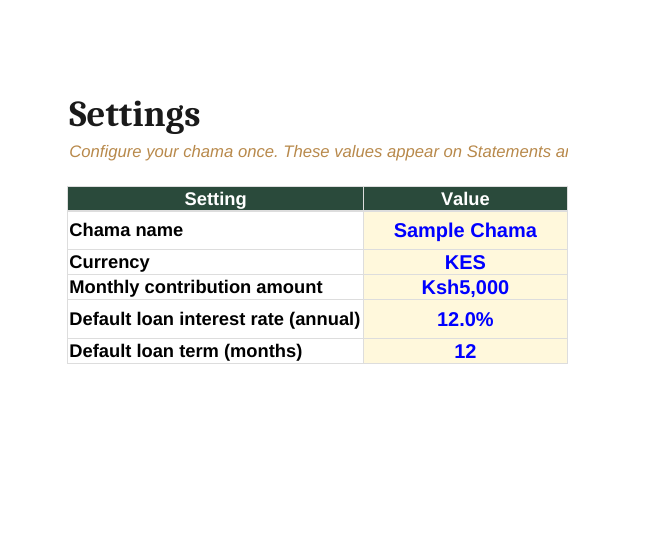
The essentials to capture:
- Chama name — appears on every statement and report
- Currency — KES for almost all Kenyan chamas
- Monthly contribution amount — what each member is expected to pay each month (e.g., Ksh 5,000)
- Default loan interest rate — your standard rate, expressed annually (12% is common in Kenya)
- Default loan term — typical loan duration in months (often 6 or 12)
Why bother with defaults? Because consistency is the whole point. If your chama's standard loan is "12% over 12 months," you don't want to retype that for every loan. You want the system to assume it, and only override when a specific loan is different.
Step 2: Build your member registry
Next, list every member with a unique ID — something like M001, M002, M003. This is the single most important record-keeping habit you can adopt.

The unique ID matters because names change (people get married, use nicknames, share first names with other members), but IDs don't. When you record a contribution from "Mary," you don't want to wonder which Mary. M003 is unambiguous forever.
Capture for each member:
- Member ID (M001, M002, …)
- Full name
- Phone number (the M-Pesa number is most useful)
- Email (for sending statements)
- Date joined
- Status (Active, Dormant, Exited)
Once members are in the registry, every other sheet should reference them by ID — never by re-typing names. This prevents the classic chama spreadsheet disaster where "John Kariuki" and "John kariuki" and "J. Kariuki" appear as three different people.
Step 3: Record every transaction in one place
Here's the rule that separates good chama tracking from bad: every event lives in one transactions sheet. Not one sheet per member. Not one sheet per month. One transactions sheet, ever.
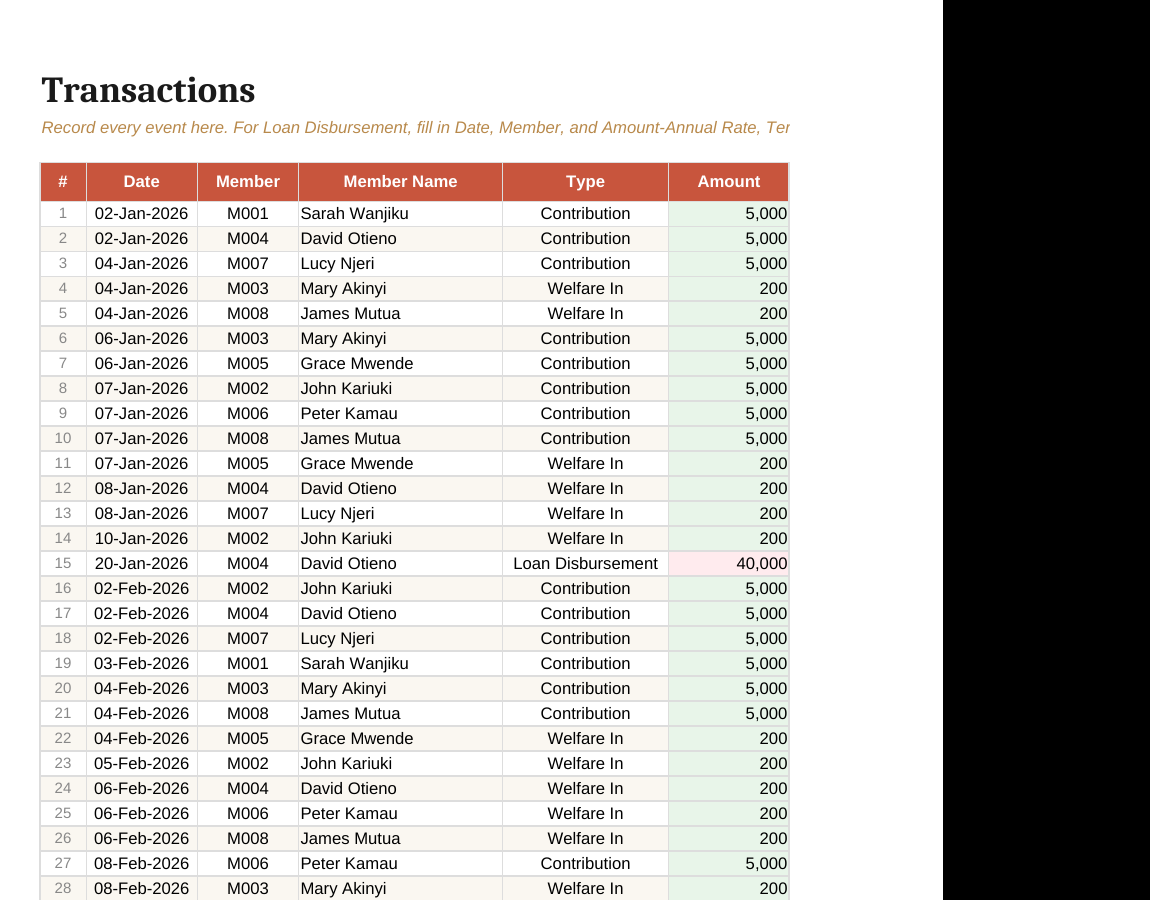
Each row records one event:
- Date — when the money moved
- Member ID — who it relates to (auto-fills the name from your registry)
- Type — Contribution, Welfare In, Welfare Out, Loan Disbursement, Loan Repayment, etc.
- Amount — the shilling value
- Payment Method — Cash, M-Pesa, Bank Transfer, Cheque
- Reference — the M-Pesa code, cheque number, or bank slip
- Notes — anything specific (e.g., "Installment 3/12")
Why one sheet? Because everything else — member balances, loan progress, the dashboard — is just a different view of this single source of truth. If you record a payment in one place and it shows up automatically in three other reports, your tracking is bulletproof. If you have to enter the same payment in three sheets, you'll make mistakes and lose trust.
A note on payment references
Always record the M-Pesa transaction code (the seven-character one like MP356787) or the bank slip number. This lets any member dispute a missing entry by quoting the code, and lets the treasurer prove the transaction happened. Without it, "I paid you" versus "no you didn't" becomes unsolvable.
Step 4: Manage loans without the headaches
Loans are where most chamas get into real trouble. The treasurer issues a loan, writes "Mary borrowed 30,000" somewhere, and three months later nobody remembers the rate, the term, or how much she's repaid. By month six, half the chama believes Mary is delinquent and the other half believes she's paid in full.
The fix: treat each loan as a distinct contract with five required fields, and let the sheet calculate the rest.
When a loan is disbursed, you record:
- Principal — amount borrowed (e.g., Ksh 30,000)
- Annual interest rate — e.g., 12%
- Term in months — e.g., 6 months
- Loan ID — auto-generated, unique to this loan
- Disbursement date
The system then calculates automatically:
- Total interest (using flat-rate: Principal × Rate × Term ÷ 12)
- Total payable (Principal + Total Interest)
- Monthly installment (Total Payable ÷ Term)
- Expected end date
For a 6-month loan of Ksh 30,000 at 12% annual flat rate:
| Field | Value |
|---|---|
| Principal | Ksh 30,000 |
| Total interest | Ksh 1,800 |
| Total payable | Ksh 31,800 |
| Monthly installment | Ksh 5,300 |
That's the contract. Every repayment after that simply reduces the balance. No re-calculation needed.
Flat rate vs reducing balance
Most Kenyan chamas use flat-rate interest because it's simple to calculate and explain. The interest is computed once on the original principal, and divided across the term. It's slightly more expensive for the borrower than reducing-balance interest, but the simplicity is what keeps chamas from arguing.
If your chama prefers reducing-balance interest (where interest is calculated on the outstanding balance each month), the principle is the same — you just need a sheet that handles the more complex math. The Karatasi tracker uses flat rate by default but you can adjust the calculation if needed.
One loan per member at a time
A simple rule that prevents most chama loan disasters: each member can have only one active loan at a time. Once they finish repaying, they can take another. This keeps the chama's exposure to any one member predictable, and stops the slide into "Mary owes us a confusing pile of overlapping loans."
Step 5: Give every member their own statement
Transparency is the bedrock of trust. Every member should be able to see, at any time, exactly:
- How much they've contributed (lifetime and this year)
- How much welfare they've paid in
- Any loans they've taken and the balance remaining
- Their full transaction history
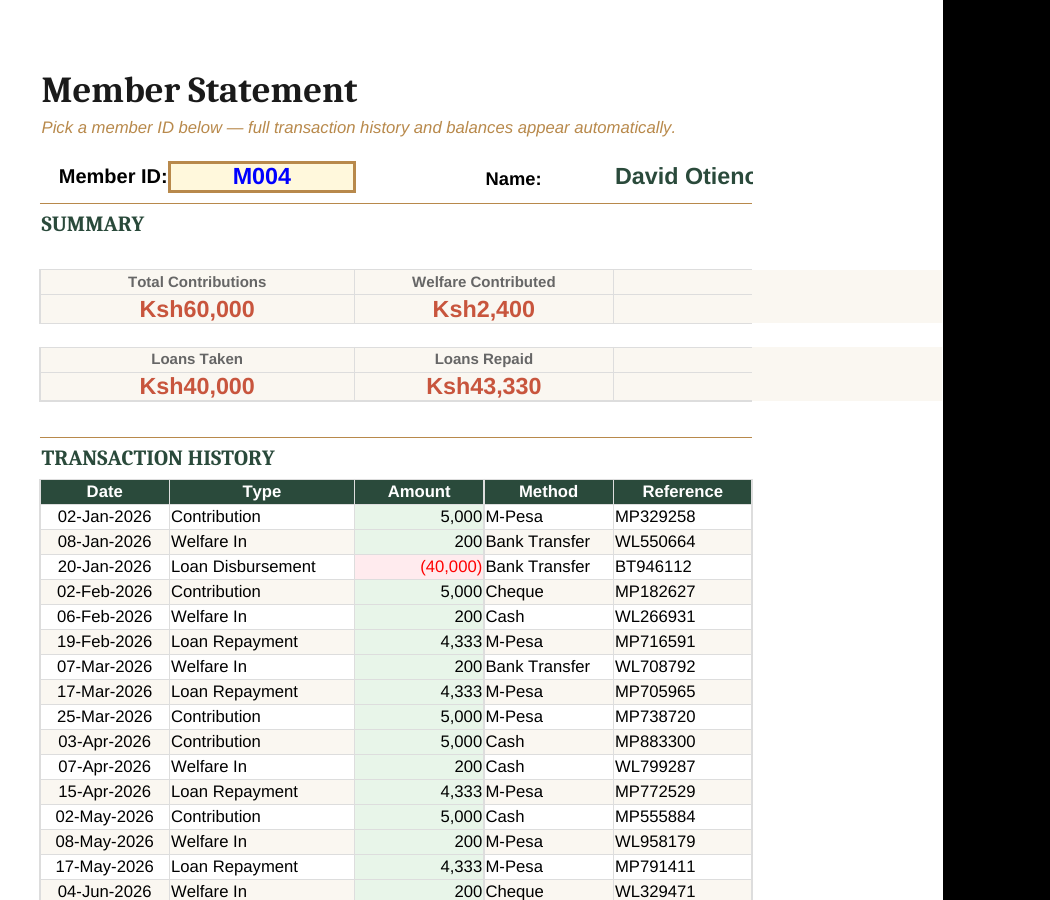
In a good system, generating this statement is a single dropdown selection — you pick the member, and their entire history populates instantly. No copy-paste, no manual filtering, no errors.
This serves three purposes:
- Members can self-verify. They check their own records before complaining, which prevents most disputes.
- The treasurer is protected. If a member alleges a missing payment, the statement is the answer.
- It speeds up meetings. Instead of "let me check the book," every member arrives knowing their position.
Send these out monthly. WhatsApp works for sharing, but email is better for a permanent record.
Step 6: Track loan progress separately
Beyond the member statement, every active loan needs its own focused view: how much has been repaid, what's left, and how many installments remain.
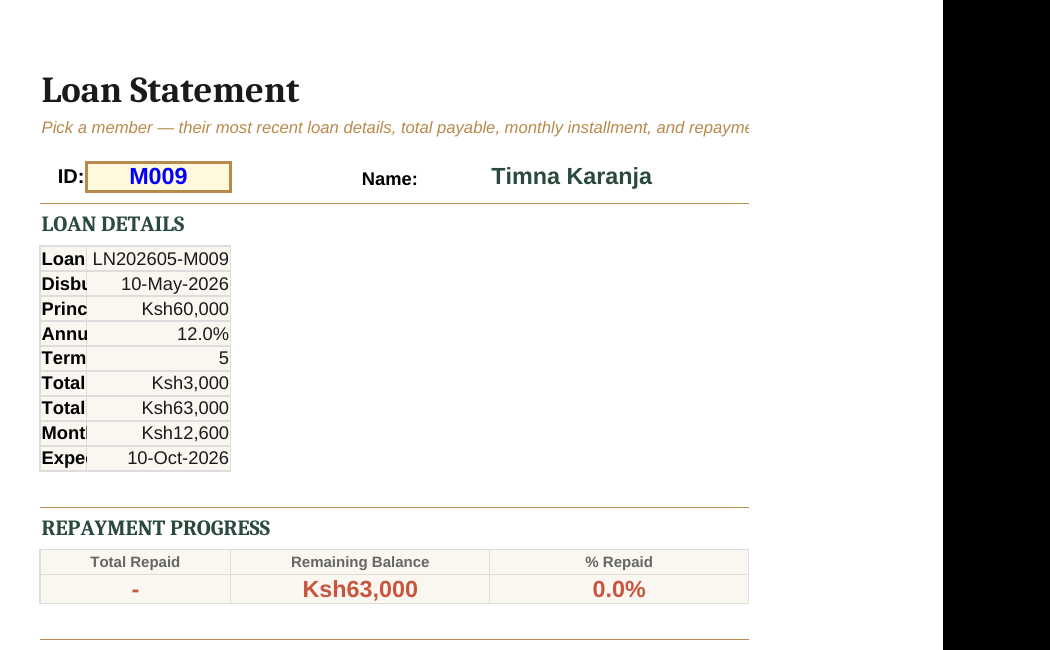
A clear loan statement answers:
- What was the original loan amount?
- What's the total payable?
- How much has been repaid to date?
- What's the remaining balance?
- How many installments completed vs total?
- When was each installment paid?
When this is automatic — flowing directly from the transactions sheet — you eliminate the most common cause of chama loan disputes: stale or contradictory loan records.
Step 7: Watch the big picture with a dashboard
Individual records are critical, but you also need a 30,000-foot view. How is the chama doing this year? Are we collecting what we should? Are loans being repaid on time? Do we have enough cash on hand?
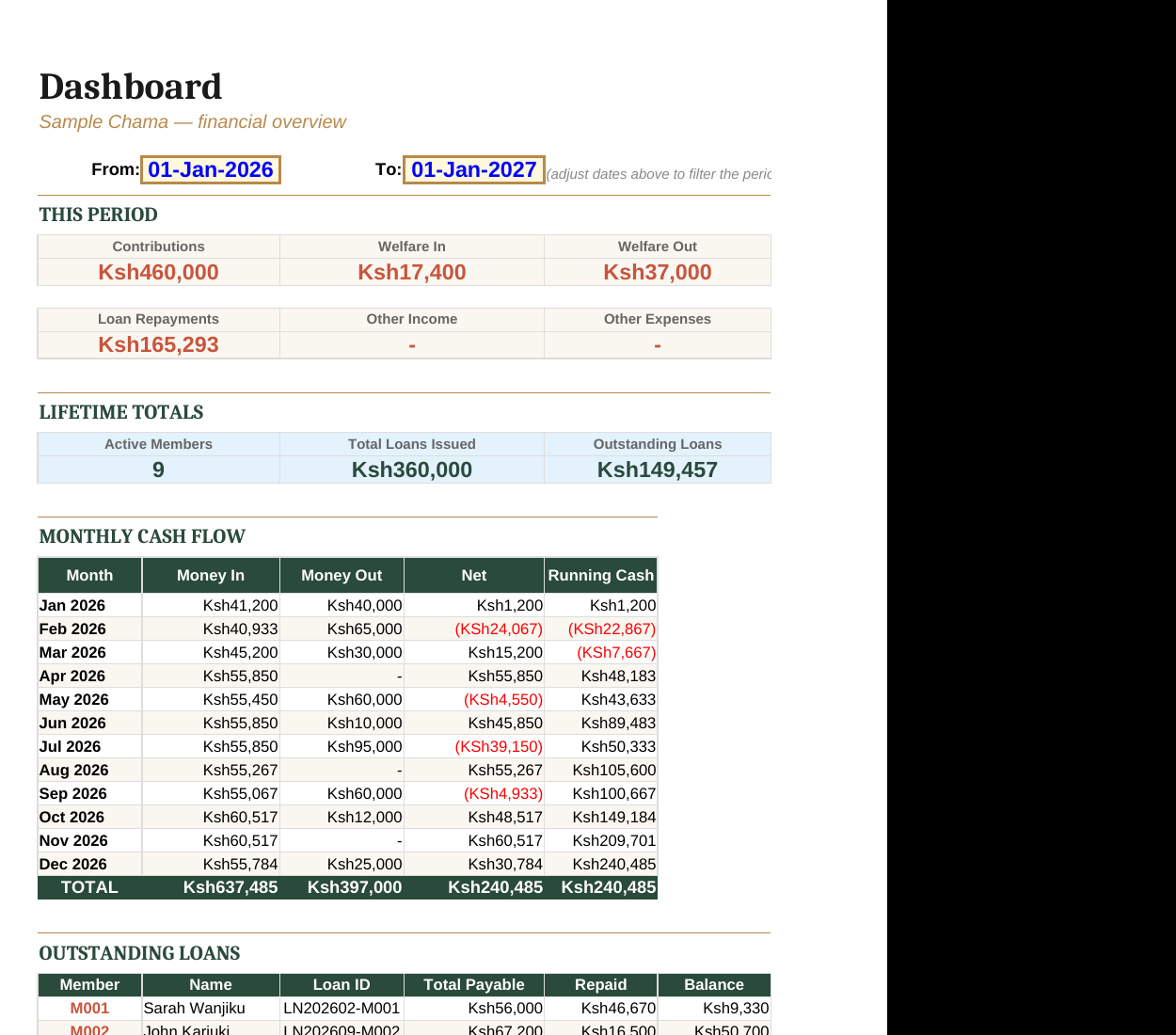
A useful chama dashboard tracks:
- This period totals — contributions, welfare in/out, loan repayments, other income/expenses
- Lifetime totals — total loans issued, total still outstanding, active members
- Monthly cash flow — money in vs money out, plus running cash position
- Outstanding loans — by member, with balance remaining
Make the period filterable. Looking at the last quarter is a different question from looking at the full year, and a dashboard that locks you to one view loses half its usefulness.
Common mistakes to avoid
After reviewing how dozens of chamas track their money, the same six mistakes keep appearing:
- No unique member IDs. Names change; IDs don't. Use M001, M002, etc.
- Multiple sheets for the same data. One transactions sheet, ever. All views derive from it.
- Skipping the M-Pesa reference. Without it, disputes are unresolvable.
- Mixing welfare with main savings. Welfare is for emergencies; savings are for members. Track them separately so you always know what's available.
- No standard loan template. Every loan must capture principal, rate, term, and disbursement date. Anything less leads to chaos.
- No monthly statements to members. Transparency isn't optional — it's the foundation of trust.
Putting it all together
A working chama tracking system is not complicated, but it does require discipline. The hard part isn't the math — it's recording every event consistently, in one place, the moment it happens.
If you want to skip the spreadsheet-building stage and use something that already enforces these rules, the Karatasi Chama Tracker implements everything described in this guide: settings sheet for one-time configuration, member registry with unique IDs, single transactions sheet with dropdowns to prevent typos, automatic flat-rate loan calculations, per-member statements, per-loan statements, and a filterable dashboard. It's a one-time purchase, downloadable as an Excel file, and works on any computer with Microsoft Excel or LibreOffice.
But whether you use this template, build your own, or hire someone to set one up — the principles are the same. Get them right, and your chama will run smoothly for years. Get them wrong, and no amount of meetings will fix it.
Track every shilling. Give every member visibility. Treat every loan as a contract. That's it. That's the whole game.
Want a complete chama tracking system that does all of this out of the box? Browse Karatasi templates →
Ready-made for Kenyan businesses
Skip the spreadsheet building. Browse our KRA-compliant Excel templates.
Browse templates →